
| 일 | 월 | 화 | 수 | 목 | 금 | 토 |
|---|---|---|---|---|---|---|
| 1 | 2 | 3 | 4 | 5 | 6 | |
| 7 | 8 | 9 | 10 | 11 | 12 | 13 |
| 14 | 15 | 16 | 17 | 18 | 19 | 20 |
| 21 | 22 | 23 | 24 | 25 | 26 | 27 |
| 28 | 29 | 30 | 31 |
- Replacation
- 고릴라볼링장
- 오삼철판볶음
- useEffect
- 신미낙지
- BDD
- NVM
- 판교
- 오뚜기숯불소금구이
- 양살치살
- react
- SpringCamp
- nginx
- Java
- 강다니엘
- docker
- DockerCompose
- NapuCon2016
- Hook
- SpockFramework
- 진1926
- State
- SpringCamp2019
- MariaDB
- SetMail
- 바스트로37
- react component
- SpringCamp2017
- 전나라동동공주
- Spring
- Today
- Total
| 일 | 월 | 화 | 수 | 목 | 금 | 토 |
|---|---|---|---|---|---|---|
| 1 | 2 | 3 | 4 | 5 | 6 | |
| 7 | 8 | 9 | 10 | 11 | 12 | 13 |
| 14 | 15 | 16 | 17 | 18 | 19 | 20 |
| 21 | 22 | 23 | 24 | 25 | 26 | 27 |
| 28 | 29 | 30 | 31 |
- Replacation
- 고릴라볼링장
- 오삼철판볶음
- useEffect
- 신미낙지
- BDD
- NVM
- 판교
- 오뚜기숯불소금구이
- 양살치살
- react
- SpringCamp
- nginx
- Java
- 강다니엘
- docker
- DockerCompose
- NapuCon2016
- Hook
- SpockFramework
- 진1926
- State
- SpringCamp2019
- MariaDB
- SetMail
- 바스트로37
- react component
- SpringCamp2017
- 전나라동동공주
- Spring
- Today
- Total
Note
Maven 본문
빌드 툴로 많이 알려진 메이븐은 빌드 툴이라기 보다는 프로젝트 관리 툴이라고 지칭해야 한다.메이븐은 소스코드로부터 배포 가능한 산출물을 빌드할 뿐만 아니라, 의존성 관리, 패키징, 문서화, 자동화 테스트, 각종 리포팅, 배포 등 여러가지 기능을 지원한다.메이븐에서 지원하는 기능을 사용하기 위해서는 pom.xml이라는 파일에 사용할 기능에 대해서 명시해야한다.메이븐의 기본 구조는 아래와 같다.
<project xmlns="http://maven.apache.org/POM/4.0.0"
         xmlns:xsi="http://www.w3.org/2001/XMLSchema-instance"
         xsi:schemaLocation="http://maven.apache.org/POM/4.0.0 http://maven.apache.org/xsd/maven-4.0.0.xsd">
  <modelVersion>4.0.0</modelVersion> <1>

  <groupId>kr.pe.nuti</groupId> <2>
  <artifactId>build-deployment</artifactId> <3>
  <version>1.0.0-SNAPSHOT</version> <4>
  <packaging>jar</packaging> <5>
  <name>build deployment</name> <6>
  <description>build and deployment description.</description> <7>
  <url>https://blog.nuti.pe.kr</url> <8>

  <properties>
    <url.github>https://github.com/hyeonil</url.github>
    ...
  </properties> <9>

  <modules>...</modules> <10>
  <parent>...</parent> <11>
  <reporting>...</reporting> <12>
  <dependencies>...</dependencies> <13>
  <build>...</build> <14>
  <dependencyManagement>...</dependencyManagement> <15>
  <distributionManagement>...</distributionManagement> <16>
  <pluginManagement>...</pluginManagement> <17>
  <repositories>...</repositories> <18>
  <pluginRepositories>...</pluginRepositories> <19>
  <profiles>...</profiles> <20>
</project>
<1> POM 모델의 버전을 명시한다.
<2> 프로젝트를 소유하는 그룹의 정보를 작성한다. 흔히 대표 도메인을 역순으로 작성한다.
<3> 프로젝트를 식별하는 유일한 아이디를 명시한다. 이 아이디는 프로젝트 소유 그룹내에서 유일해야 된다.
<4> 프로젝트 버전에 대해서 명시한다. 개발이 완료되지 않은 버전일 경우 -SNAPSHOT을 접미사로 사용해서 개발중임을 명시한다.
<5> 프로젝트를 어떻게 패키징할지 명시한다. 기본값으로 jar이고, war, ear, pom을 사용할 수 있다.
<6> 프로젝트의 이름을 작성한다.
<7> 프로젝트에 대해 설명하는 설명문을 작성한다.
<8> 프로젝트의 홈페이지를 작성한다.
<9> pom.xml내에서 사용할 프로퍼티(변수)에 대해서 명시한다.
<10> 다중 모듈 프로젝트일 경우 하위 프로젝트에 대하여 명시한다.
<11> 다중 모듈 프로젝트일 경우 상위 프로젝트에 대하여 명시한다.
<12> site lifecycle에서 실행할 plugin정보를 명시한다.
<13> 프로젝트에서 사용할 의존성에 대해서 명시한다.
<14> 프로젝트를 빌드하는 방법에 대하여 명시한다.
<15> 다중 모듈 프로젝트일 경우 상위 프로젝트의 의존성을 하위 프로젝트에서 사용할 수 있도록 명시한다.
<16> 프로젝트를 배포할 원격 서버에 대해서 명시한다.
<17> 다중 모듈 프로젝트일 경우 플러그인 설정을 하위 모듈에서도 사용할 수 있도록 한다.
<18> 프로젝트에서 의존성관계를 가지는 라이브러리를 명시한다.
<19> 플러그인을 받아오는 저장소 정보를 명시한다.
<20> 프로젝트 환경별로 달리 사용할 스크립트에 대해서 작성한다. properties, dependencies, build등을 재정의 할 수 있다.
Options
modules
<modules>
  <module>child-project</module> <1>
</modules>
<1> 하위 모듈 프로젝트의 artifactId를 명시한다.
parent
<parent>
  <groupId>kr.pe.nuti</groupId> <1>
  <artifactId>parent-project</artifactId> <2>
  <version>1.0.0</version> <3>
</parent>
<1> 상위 프로젝트의 groupId를 명시한다.
<2> 상위 프로젝트의 artifactId를 명시한다.
<3> 상위 프로젝트의 version을 명시한다.
reporting
<reporting>
  <plugins> <1>
    <plugin>
      <groupId>org.apache.maven.plugins</groupId> <2>
      <artifactId>maven-javadoc-plugin</artifactId> <3>
      <version>2.9.1</version> <4>
      <executions> <5>
        <execution>
          <id>attach-javadocs</id> <6>
          <configuration> <7>

          </configuration>
        </execution>
      </executions>
    </plugin>
  </plugins>
</reporting>
<1> site lifecycle 실행할 플러그인 목록
<2> 플러그인 groupId
<3> 플러그인 artifactId
<4> 플러그인 version
<5> 플러그인 실행 환경 설정
<6> 플러그인 실행 환경 유일 id
<7> 플러그인 실행 환경 옵션 설정
dependencies
<dependencies>
  <dependency>
    <groupId>log4j</groupId> <1>
    <artifactId>log4j</artifactId> <2>
    <version>1.2.17</version> <3>
    <exclusions> <4>
      <exclusion>
        <groupId>javax.mail</groupId> <5>
        <artifactId>mail</artifactId> <6>
      </exclusion>
      <exclusion>
        <groupId>javax.jms</groupId>
        <artifactId>jms</artifactId>
      </exclusion>
      <exclusion>
        <groupId>com.sun.jdmk</groupId>
        <artifactId>jmxtools</artifactId>
      </exclusion>
      <exclusion>
        <groupId>com.sun.jmx</groupId>
        <artifactId>jmxri</artifactId>
      </exclusion>
    </exclusions>
    <scope>provided</scope> <7>
  </dependency>
</dependencies>
<1> 의존성 라이브러리의 groupId를 명시한다.
<2> 의존성 라이브러리의 artifactId를 명시한다.
<3> 의존성 라이브러리의 version을 명시한다.
<4> 의존성 라이브러리에 포함되는 의존성 중 제외할 라이브러리를 명시한다.
<5> 의존성 라이브러리에 포함되는 의존성 중 제외할 라이브러리의 groupId를 명시한다.
<6> 의존성 라이브러리에 포함되는 의존성 중 제외할 라이브러리의 artifactId를 명시한다.
build
<build>
  <finalName>${artifactId}-${project.version}</finalName> <1>
  <resources> <2>
    <resource>
      <directory>src/main/resources/${environment}</directory> <3>
    </resource>
  </resources>
  <testResources> <4>
    <testResource>
      <directory>src/main/webapp</directory> <5>
    </testResource>
  </testResources>
  <plugins> <6>
    <plugin>
      <groupId>org.apache.maven.plugins</groupId> <7>
      <artifactId>maven-compiler-plugin</artifactId> <8>
      <version>3.6.0</version> <9>
      <configuration> <10>
        <source>${version.java}</source>
        <target>${version.java}</target>
        <encoding>UTF-8</encoding>
        <useIncrementalCompilation>false</useIncrementalCompilation>
        <compilerArgument>-Xlint:all</compilerArgument>
        <showWarnings>true</showWarnings>
        <showDeprecation>true</showDeprecation>
      </configuration>
    </plugin>
  </plugins>
</build>
<1> 최종 빌드될 파일의 이름
<2> 리소스 설정
<3> 리소스로 사용할 디렉토리 지정
<4> 테스트 환경 리소스 설정
<5> 테스트 환경 리소스로 사용할 디렉토리 설정
<6> 플러그인 목록 설정. 각각의 플러그인별로 execution과 configuration이 다르니 각 플러그인별로 확인해야 한다.
<7> 플러그인 groupId
<8> 플러그인 artifactId
<9> 플러그인 version
<10> 플러그인 실행 옵션. 각 플러그인별로 다르므로 플러그인 문서에서 확인해야 한다.
dependencyManagement
<dependencyManagement>
  <dependencies>
    <dependency>
      <groupId>org.apache.commons</groupId> <1>
      <artifactId>commons-lang3</artifactId> <2>
      <version>3.4</version> <3>
    </dependency>
  </dependencies>
</dependencyManagement>
<1> 의존성 라이브러리의 groupId
<2> 의존성 라이브러리의 artifactId
<3> 의존성 라이버리리의 version
distributionManagement
<distributionManagement>
  <repository> <1>
    <id>maven-releases</id> <2>
    <name>release repository</name> <3>
    <url>https://repo.maven/maven-release</url> <4>
  </repository>
  <snapshotRepository> <5>
    <id>maven-snapshots</id> <6>
    <name>snapshot repository</name> <7>
    <url>https://repo.maven/maven-snapshot</url> <8>
  </snapshotRepository>
</distributionManagement>
<1> Release 버전을 배포할 원격 저장소 정보
<2> 레파지토리 id. settings.xml에 작성한 id와 매핑된다.
<3> 레파지토리의 이름을 명시
<4> 레파지토리의 url을 명시
<5> Snapshot 버전을 배포할 원격 저장소 정보. 프로젝트 버전에 -SNAPSHOT이라는 접미어를 사용하면 여기에 배포된다.
<6> 레파지토리 id. settings.xml에 작성한 id와 매핑된다.
<7> 레파지토리의 이름을 명시
<8> 레파지토리의 url을 명시
pluginManagement
<pluginManagement>
  <plugins> <1>
  </plugins>
</pluginmanagement>
<1> 다중 모듈 프로젝트에서 하위 모듈에서도 사용할 플러그인 정보를 설정한다. 설정방법은 plugin설정 방법과 동일하다.
repositories
<repositories>
  <repository>
    <id>maven-public</id> <1>
    <url>https://repo.maven/maven-public</url> <2>
    <releases> <3>
      <enabled>true</enabled> <4>
    </releases>
    <snapshots> <5>
      <enabled>true</enabled> <6>
      <updatePolicy>always</updatePolicy> <7>
    </snapshots>
  </repository>
  <repository>
    <id>in-project</id> <8>
    <name>custom jars</name>
    <url>file://${project.basedir}/lib</url> <9>
  </repository>
</repositories>
<1> 레파지토리 id. settings.xml에 작성한 id와 매핑된다.
<2> 레파지토리의 url을 명시
<3> Release 버전에 대한 옵션 설정
<4> Release 버전을 사용할 지 설정
<5> Snapshot 버전에 대한 옵션 설정
<6> Snapshot 버전을 사용할 지 설정
<7> Snapshot 버전의 업데이트 정책을 사용(같은 버전이 여러개가 있을 수 있으므로 업데이트를 어떻게할 지 지정한다.)
<8> 레파지토리 id
<9> 로컬 레파지토리의 경로 지정
pluginRepositories
<pluginRepositories>
    <pluginRepository>
        <id>central</id> <1>
        <name>plugin repository</name> <2>
        <url>https://repo.maven/maven-public</url> <3>
        <layout>default</layout> <4>
        <snapshots> <5>
            <enabled>false</enabled> <6>
        </snapshots>
        <releases> <7>
            <updatePolicy>never</updatePolicy> <8>
        </releases>
    </pluginRepository>
</pluginRepositories>
<1> plugin repository의 id 지정
<2> plugin repository의 이름 지정
<3> plugin repository의 url 지정
<4> 저장소가 artifact를 찾고 저장하기 위해 사용하는 디렉토리 레이아웃. legacy와 default를 사용 가능
<5> Snapshot버전에 대한 설정
<6> Snapshot버전을 사용할 지 지정
<7> Release버전에 대한 설정
<8> Release버전의 업데이트 정책 설정
profiles
<profiles>
  <profile> <1>
    <id>development</id> <2>
    <properties> <3>
      <environment>development</environment>
    </properties>
  </profile>
  <profile>
    <id>production</id>
    <properties>
      <environment>production</environment>
    </properties>
  </profile>
</profiles>
<1> 빌드 옵션에 따라 별도로 사용할 설정 지정
<2> profile id. 메이븐 빌드 시 -P옵션을 사용해 지정한다.
<3> 해당 profile에서 사용할 설정 지정 properties뿐만 아니라 build, dependencies등 다른 설정들도 재정의 할 수 있다.
settings.xml
각각의 사용자별로 별도의 설정을 지정하고자 할 때 사용한다. 경로는 ~/.m2/settings.xml에 위치하게 된다.
<settings xmlns="http://maven.apache.org/SETTINGS/1.0.0"
  xmlns:xsi="http://www.w3.org/2001/XMLSchema-instance"
  xsi:schemaLocation="http://maven.apache.org/SETTINGS/1.0.0
                      http://maven.apache.org/xsd/settings-1.0.0.xsd"> <1>
  <servers> <2>
      <server>
          <id>maven-releases</id> <3>
          <username>username</username> <4>
          <password>password</password> <5>
      </server>
      <server>
          <id>maven-snapshots</id>
          <username>username</username>
          <password>password</password>
      </server>
      <server>
          <id>maven-public</id>
          <username>username</username>
          <password>password</password>
      </server>
  </servers>
</settings>
<1> settings.xml의 root
<2> maven repository server의 정보를 작성한다.
<3> 서버의 id를 명시한다. 이 정보는 pom.xml의 repository의 id와 매핑된다.
<4> 서버가 private repository일 경우 사용자 이름을 작성한다.
<5> 서버가 private repository일 경우 사용자 비밀번호를 작성한다.
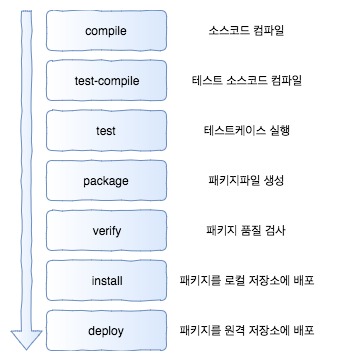
Lifecycle
'Dev > Etc' 카테고리의 다른 글
| Dockerfile (0) | 2019.11.24 |
|---|---|
| docker-compose (0) | 2019.11.24 |
| Clean Code (0) | 2019.11.24 |
| Nginx Loadbalance 설정 (0) | 2019.11.24 |
| CentOS 메일서버 설정 및 자바에서 메일 발송하기 (0) | 2019.11.24 |